Proxmox Server Optimization Techniques
Welcome to the server optimization guide for Proxmox Virtual Environment (VE). Ensuring optimal performance of your Proxmox servers is crucial for providing a seamless and efficient virtualization experience. This guide will cover several key areas, including CPU optimization, memory management, storage tuning, and network configuration. By implementing these techniques, you can enhance the performance and stability of your Proxmox environment.
CPU Optimization
CPU performance is often a bottleneck in virtualized environments. Efficient CPU utilization is essential to maximizing the number of virtual machines (VMs) your Proxmox server can handle without performance degradation. Here are some best practices for CPU optimization:
-
CPU Pinning:
Pinning VMs to specific CPU cores can improve performance by reducing context switching and cache misses. Use the
qm set VMID -cpulimitcommand to assign specific cores to a VM. For example,qm set 100 -cpulimit 2assigns VM 100 to two CPU cores. -
CPU Governor:
Adjust the CPU governor on the Proxmox host. The "performance" governor can provide better performance than the "ondemand" governor, especially for demanding workloads. Use the
cpupower frequency-set -g performancecommand. - NUMA Configuration: Non-Uniform Memory Access (NUMA) architecture can impact performance. Ensure that your VMs are configured to utilize local memory resources within their NUMA node. Proxmox VE automatically tries to optimize NUMA placement, but manual adjustments might be necessary for specific workloads.
- CPU Overcommit: Carefully consider CPU overcommit ratios. While overcommitting CPUs can allow you to run more VMs, it can also lead to performance issues if VMs are constantly competing for CPU resources. Monitor CPU usage to determine the optimal overcommit ratio for your environment.
Memory Management
Efficient memory management is critical for Proxmox servers. Insufficient memory can lead to swapping, which significantly degrades performance. Here's how to optimize memory usage:
-
KSM (Kernel Same-page Merging):
KSM allows the kernel to identify and merge identical memory pages, reducing overall memory usage. Enable KSM by starting the
ksmdservice. You can configure KSM settings in the/etc/ksm.conffile. - Memory Ballooning: Memory ballooning allows VMs to dynamically adjust their memory usage based on demand. Install the balloon driver in your VMs to enable this feature. Proxmox VE supports memory ballooning by default.
- Reserved Memory: Avoid allocating excessive memory to VMs that don't need it. Reserve only the necessary amount of memory for each VM to prevent unnecessary memory consumption.
- Swap Space: Ensure that your Proxmox host has sufficient swap space. While swap should be avoided if possible, it can provide a buffer during peak memory usage. However, relying on swap excessively can lead to performance issues.
Storage Optimization
Storage performance significantly impacts the overall performance of your Proxmox environment. Slow storage can lead to slow VM boot times, application performance bottlenecks, and data corruption risks. Optimize your storage with these techniques:
- Storage Type: Choose the appropriate storage type for your workloads. SSDs (Solid State Drives) offer significantly better performance than traditional HDDs (Hard Disk Drives), especially for I/O-intensive workloads. NVMe drives provide even higher performance than SSDs.
- RAID Configuration: Use RAID (Redundant Array of Independent Disks) to improve performance and provide data redundancy. RAID 10 is often a good choice for virtualization environments, offering a balance of performance and redundancy.
- Storage Caching: Implement storage caching to improve I/O performance. Use technologies like LVM caching or ZFS ARC (Adaptive Replacement Cache) to cache frequently accessed data on faster storage.
- Filesystem Choice: Select the appropriate filesystem for your storage. ZFS offers advanced features like data integrity checks, snapshots, and compression, but it can be resource-intensive. XFS is a good choice for general-purpose storage.
- Thin Provisioning: Use thin provisioning to allocate storage space on demand. Thin provisioning allows you to allocate more storage to VMs than is physically available, but it requires careful monitoring to prevent running out of storage space.
Network Tuning
Network performance is crucial for virtualized environments, especially for VMs that communicate frequently with each other or with external networks. Optimize your network configuration with these techniques:
- Virtual Network Interface: Use the paravirtualized virtio network driver for your VMs. Virtio provides better performance than emulated network drivers.
- MTU (Maximum Transmission Unit): Consider increasing the MTU size to reduce overhead and improve network throughput. Jumbo frames (MTU of 9000) can provide significant performance benefits, but they require support from all network devices.
- Network Bonding: Use network bonding to aggregate multiple physical network interfaces into a single logical interface. This can improve network bandwidth and provide redundancy.
- Traffic Shaping: Implement traffic shaping to prioritize network traffic for critical VMs or applications. This can prevent resource contention and ensure that important services receive the necessary bandwidth.
Monitoring Performance Metrics
Regularly monitoring performance metrics is essential for identifying and addressing performance bottlenecks. Use tools like
top
,
htop
,
iostat
, and
vmstat
to monitor CPU usage, memory usage, disk I/O, and network traffic. Proxmox VE also provides a web-based interface for monitoring server performance.
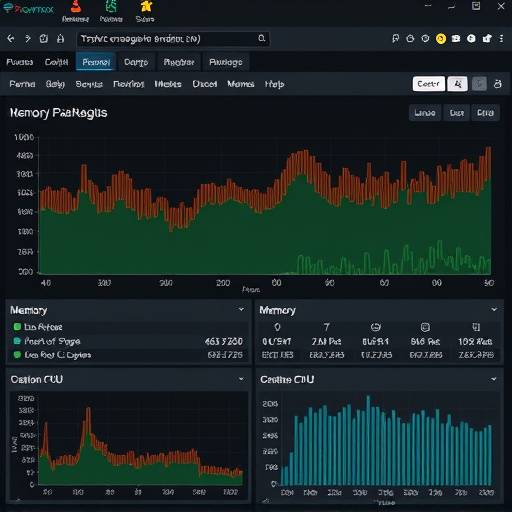
Consider setting up alerting to notify you when performance metrics exceed predefined thresholds. This can help you proactively identify and address potential issues before they impact your users.
Conclusion
Optimizing your Proxmox servers requires a comprehensive approach that considers CPU, memory, storage, and network performance. By implementing the techniques outlined in this guide, you can significantly improve the performance, stability, and scalability of your Proxmox environment. Regular monitoring and proactive tuning are essential for maintaining optimal performance over time.
For further assistance, please contact our team at Apex Virtual Solutions. We are located at 42 Venture Drive, Sacramento, CA 95834. You can reach us at (916) 555-0123 or via email at support@apexvirtualsolutions.com. Our virtualization experts, including lead consultant, Dr. Anya Sharma, are always ready to help.